The  Activity Monitor
alternative for Mac
Vitals Buddy groups every process under the app it belongs to, so you see 60 apps instead of 1,000 processes. It keeps 30 days of history, alerts you when an app misbehaves, and lives in the menu bar.
10 of 10 left at launch priceOne-time payment14-day refundOn Windows?
 Vitals Buddy
 Google Chrome3.28 GBGoogle Chrome6.0 W
Try it: every tab works. The figures are simulated, because a web page cannot read your Mac and should not.
Now I find myself stealing quick glances at the menu bar, instead of taking another sip of coffee.
macOS Activity Monitor is horrible when I’m juggling dev projects and local AI. Vitals Buddy is so much better.
cant keep vibecoding everything. for $5, i get a finished product, clean ui, and bug fixes.
Processes grouped by app
Activity Monitor lists every process. On a working Mac that is about a thousand rows, a hundred of them called Google Chrome Helper.
Vitals Buddy adds each helper to the app that launched it. Every app gets one row and one figure, so “what is using my memory?” has a one-line answer.


Vitals Buddy compared with Activity Monitor
Activity Monitor is good at showing what is happening this second. Vitals Buddy also tells you which app is responsible, what happened while you were not looking, and when something needs your attention.
The whole comparison, row by row, is at Vitals Buddy vs Activity Monitor. Comparing more than Activity Monitor? See Vitals Buddy vs iStat Menus, Vitals Buddy vs Stats, or all the Activity Monitor alternatives.
Activity MonitorVitals BuddyDev servers and open ports, by project
Vitals Buddy groups processes by the project folder they run in and shows the ports they have open.
It points out the dev server that has done nothing for three days and offers to stop it. It asks before it stops anything.
A system monitor in your menu bar
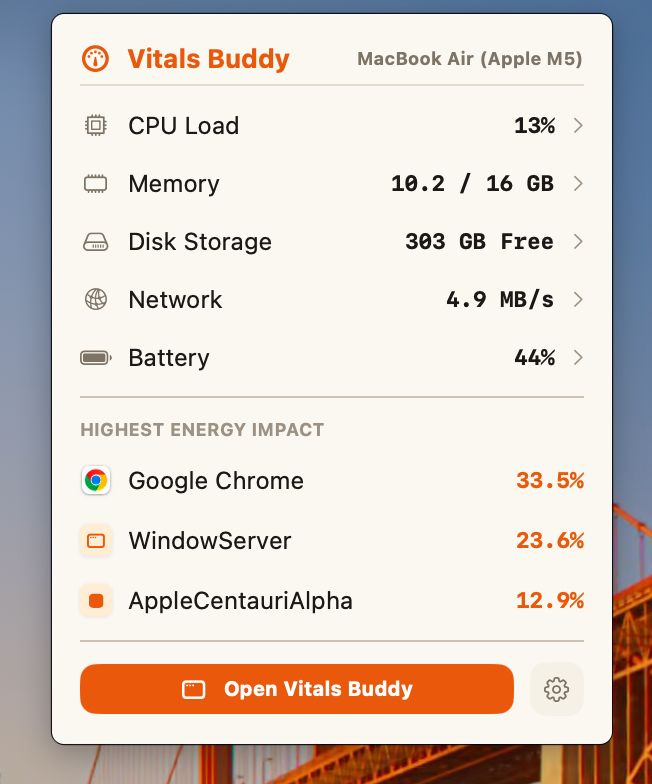
Every readout can be its own menu bar item: CPU, memory, GPU, network, disk, temperature or battery, as a value, a graph or both, with or without its icon. Hold ⌘ and drag them into any order. The icon turns into a warning sign when your Mac is under strain.
Click one for the dropdown: every metric on one screen, the busiest apps right now, and a tab for each metric with the apps behind the figure. Arrange its tiles, or switch to a list with one line per metric. Click an app and the window opens on it.
What you run stays on your Mac
An activity monitor sees every app you run and every project you work on. Vitals Buddy keeps all of it on your machine. Read the privacy details.
No account
You buy a license key. There is nothing to sign in to.
No analytics
Vitals Buddy does not report what you run, when, or for how long.
Two network requests
One checks for updates. One checks your license. That is all.
Pay once, keep it forever.
$5 launch price for the first 10 users only, $29 after. No subscription, and every update is included, for life.
Vitals Buddy for Mac
One payment, no subscriptionone-time, for one Mac
- Every feature, and every update for life
- Lifetime license for 1 Mac · Move it any time
- 14-day refund if it is not for you
macOS 15 Sequoia or later · Apple silicon and Intel · 10 MB
License key and download file both arrive directly in your email inbox within seconds. Checkout by Dodo Payments.
Frequently asked questions
Something not covered here? Email hukambuild@gmail.com and you will hear back.
Activity Monitor lists processes, about a thousand on a working Mac. Vitals Buddy lists apps. Every helper is added to the app that launched it, so each app has one figure for memory, CPU, energy, disk and network. Vitals Buddy also keeps 30 days of history, sends a notification when an app misbehaves, lives in the menu bar, and finds dev servers left running.
Get Vitals Buddy for $5 while the launch price lasts
10 of 10 left at this launch price (first 10 users only). The regular price is $29. One payment, lifetime updates, 14-day refund.